Speed-to-Lead for PI Firms: Why 5 Minutes Is No Longer Fast Enough
In the world of Personal Injury, time doesn’t just heal wounds: it kills cases.
You’ve likely heard the industry standard: “Respond to a lead within five minutes.” But in 2026, five minutes is table stakes, not a differentiator. According to Hennessey Digital’s 2025 Lead Form Response Time Study, which tested over 1,300 law firms across the U.S., only 22% of firms responded to online leads within 10 minutes. The median personal injury law firm lead response time was 19 minutes. And a significant number of firms never responded at all.
Meanwhile, Martindale-Avvo’s 2023 Understanding the Legal Consumer report found that 80% of consumers will contact another attorney if they don’t hear back within 48 hours, and half make their hiring decision within a week. In PI specifically, the urgency is arguably even higher: leads are often contacting firms from an accident scene or an emergency room, where patience is at its lowest.
If your intake process involves a notification hitting a paralegal’s inbox, who then finishes their task before picking up the phone, you are effectively subsidizing your competitor’s marketing budget.
The firms winning in 2026 don’t just have faster intake teams: they have automated response infrastructure that makes first contact in seconds and completes qualification in minutes, not hours.
Why the Response Gap Matters More in PI Than Any Other Practice Area

A personal injury lead is often a one-and-done search. They aren’t “shopping” for a lawyer in the traditional sense: they are looking for the first firm that can tell them, “We’ve got this.”
The Martindale-Avvo 2024 Understanding the Legal Consumer report found that responsiveness was cited as important by 58% of consumers when deciding to hire, ranking just behind reviews (70%) and pricing (62%). And in the 2020 edition, “slow to respond” was rated as the single biggest red flag by 49% of respondents, ahead of “too expensive.”
The Clio 2024 Legal Trends Report’s secret shopper study put this in stark terms: of 500 law firms contacted, only 33% responded to emails and only 40% answered phone calls. Nearly half of all firms were essentially unreachable by phone.
If your response time is measured in minutes while a competitor’s is measured in seconds, you are paying for the click, but they are signing the retainer.
Comparison: Manual Intake vs. Automated Response (2026)
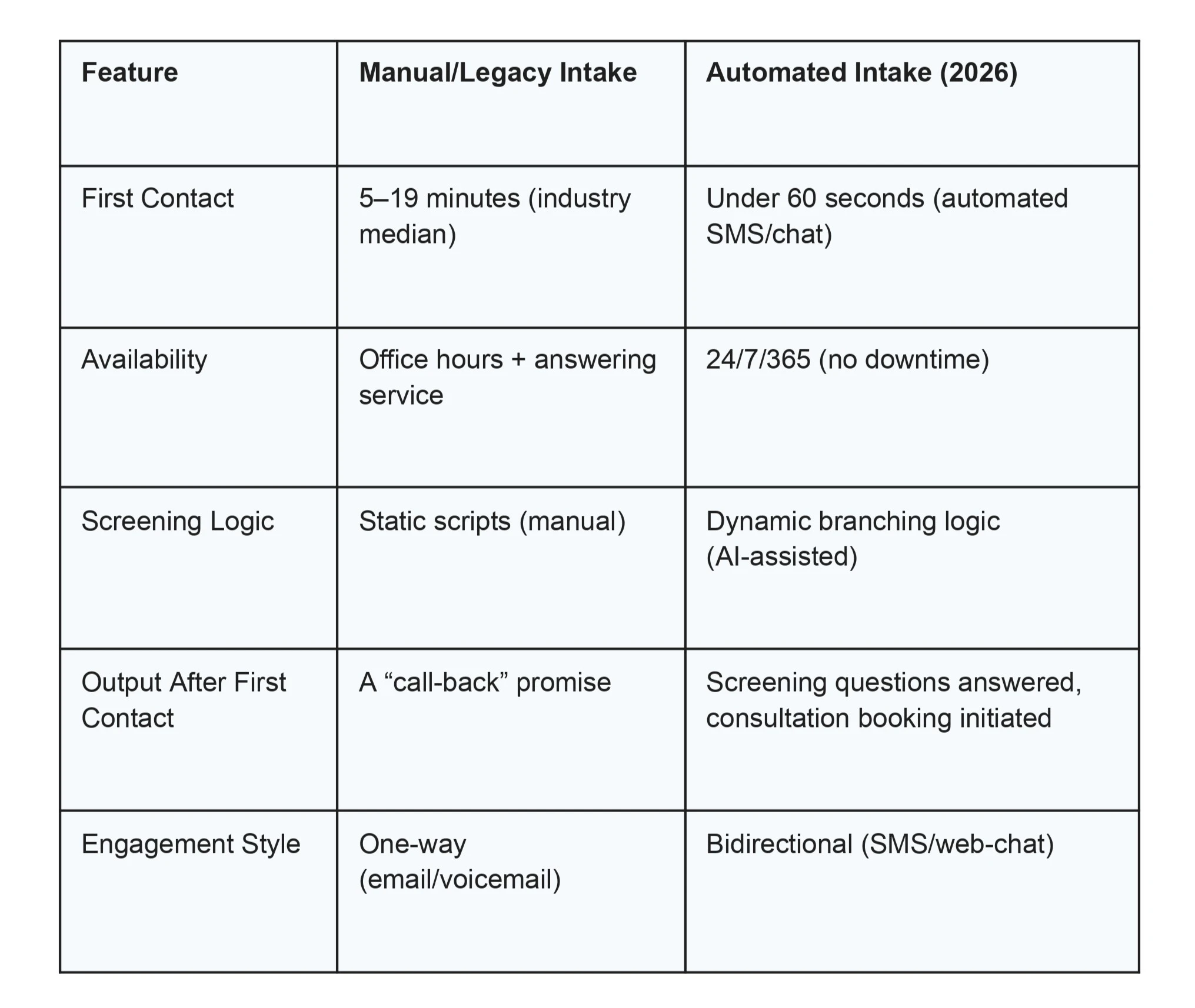
The difference isn’t just speed: it’s engagement. A lead who receives an immediate text that asks relevant questions feels taken care of. A lead who gets an auto-reply saying “we’ll call you soon” feels ignored.
The 2026 Automated Intake Workflow: What Happens Under the Hood
When we talk about closing the response gap, we aren’t talking about a better auto-responder. We’re talking about a structured, multi-step system that handles the first 60 seconds automatically so your team can focus on the next 60 minutes. Here’s how it works.
1. Instant SMS Engagement
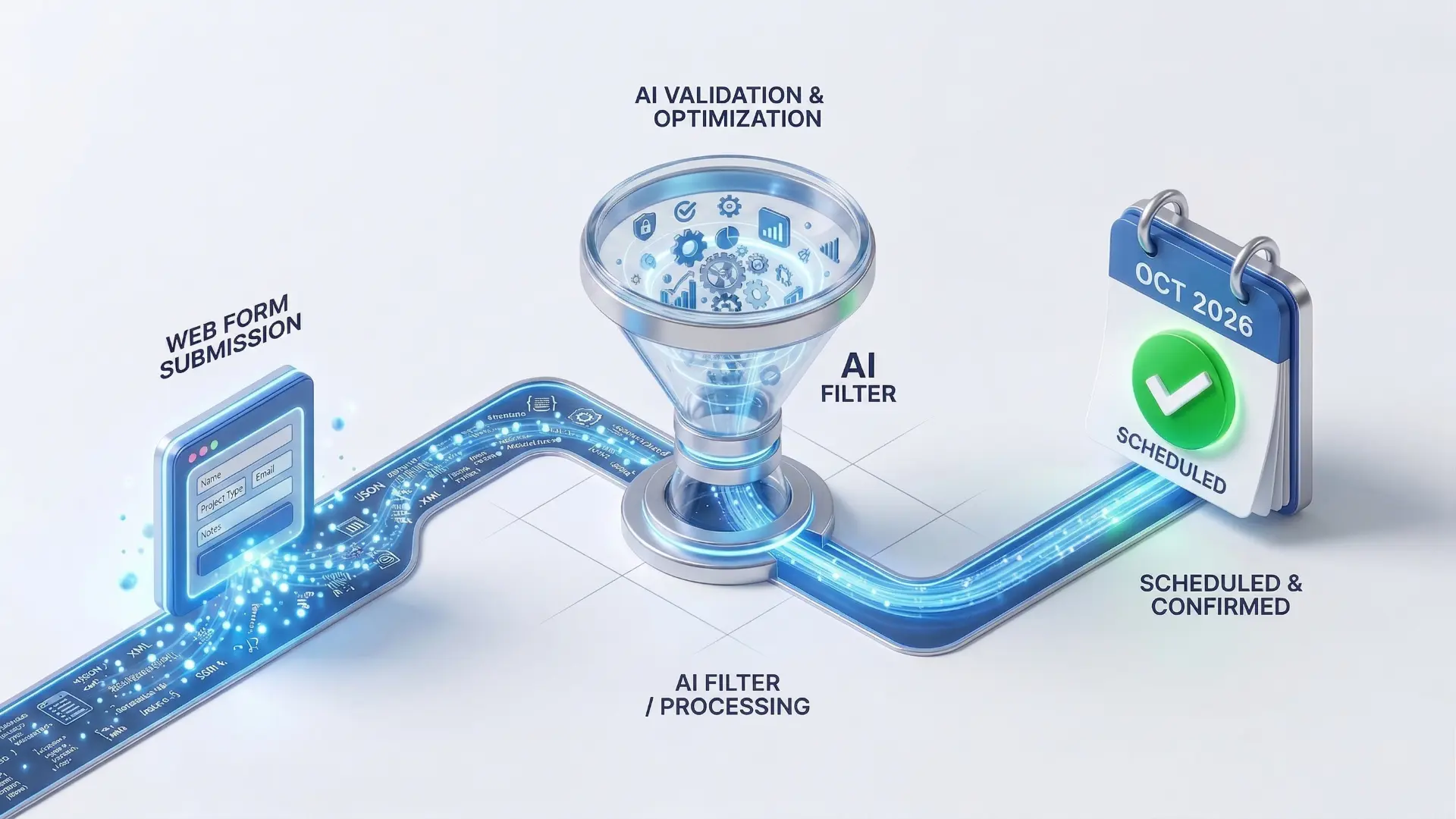
The moment a lead submits your HubSpot or GHL form, the system fires a personalized SMS within seconds. This isn’t a generic “thank you for contacting us.” It references the information the lead already provided on the form and asks the next high-value question: “Thank you for reaching out about your truck accident. Are you currently receiving medical treatment? Do you have the other driver’s insurance information?”
This initiates what behavioral scientists call a “micro-commitment.” Once a lead starts answering questions on their phone, they stop scrolling for other attorneys. You’ve effectively captured their attention before they hit the back button on their browser.
A2P compliance note: All automated SMS must comply with A2P 10DLC registration requirements. Your phone numbers need to be registered with carriers through your CRM platform, and leads must have explicitly opted in via your form submission before receiving texts. Non-compliant SMS can result in carrier blocking and fines. If you’re already running SMS through HubSpot or GHL, your provider can handle the registration, but verify that it’s in place before launching automated sequences.
2. Automated Case Screening
While the lead is texting back, the system runs the responses through predefined screening rules. It checks for your firm’s specific disqualifiers: Is the accident within your state’s statute of limitations? Is it in your jurisdiction? Did the lead report a physical injury?
To be clear: this is rule-based screening, not autonomous case evaluation. The system checks disqualifying factors against criteria you’ve defined. It doesn’t assess case merit or predict settlement value, that’s still a human job. But it catches the obvious non-starters (wrong state, expired SOL, no injury) immediately, rather than after a 20-minute phone call.
Cases that pass screening move to step 3. Cases that don’t can receive a polite automated response with referral suggestions or a note that the firm isn’t a fit, keeping your human intake team focused on high-value cases only.
3. Precision Routing and Calendar Booking
This is the infrastructure layer, and it’s where most firms fall apart. The system runs a quick name search against your Clio database via API to flag potential conflicts. (This isn’t a full conflict check, that still requires attorney review, but it catches obvious matches before time is wasted.) If the search comes back clear, the system uses your CRM’s round-robin routing to assign the lead to the right team: the pre-litigation pod for MVA cases, the catastrophic injury team for commercial vehicle accidents, and so on.
The lead then receives a calendar link and can book a consultation directly: no human needed to play phone tag. A “High-Value Lead” notification hits the assigned attorney’s phone with full context: what the lead submitted, how they answered screening questions, and when their consultation is booked.
Alt Text: “Personal injury law firm automated intake workflow showing sub-60-second first contact and CRM-based routing.”
After-Hours: Winning the “Midnight Lead”
Accidents don’t respect office hours. Some of the most valuable PI cases, DUI accidents and commercial transit collisions, happen between 11 PM and 5 AM.
Historically, firms relied on answering services. Traditional answering services that only take messages and promise callbacks create a gap: the lead is still waiting for a human to call them back. More sophisticated live intake services (like Smith.ai or LEX Reception) are better, but they still can’t match the consistency, data capture, and instant screening of a well-configured automated system.
With automated intake infrastructure, a lead who fills out your form at 2 AM gets the same immediate SMS engagement, the same screening questions, and the same calendar booking as a lead at 10 AM. By the time your team arrives Monday morning, the weekend leads have already been screened, and consultations are on the calendar. No voicemails to return. No cold leads to chase.
This doesn’t replace your intake team: it ensures that after-hours leads don’t sit cold for 12+ hours while your competitors respond.

The Infrastructure Audit: Is Your CRM Ready for Speed?
Here is the part most firms get wrong: they buy the AI tool, but their CRM is a mess.
If your HubSpot deal stages don’t map to your Clio matter statuses, or if your GHL pipelines are full of stale leads from three campaigns ago, the automation cannot route correctly. Speed-to-lead is, at its core, a data integrity problem.
To achieve sub-60-second first contact with reliable screening and routing, your CRM must have:
Standardized Field Mapping. The system needs to know exactly where to write and read the accident date, injury type, jurisdiction, and insurance information. If these fields are inconsistently labeled or scattered across custom properties, your automation will break.
API-First Architecture. Moving away from fragile “Zap” chains (where one failure silently breaks the whole sequence) and toward professional API bridges between your CRM and your practice management tool. When HubSpot talks to Clio, that connection needs to be direct, logged, and monitored.
Documented Qualification Logic. A clear Ideal Client Profile (ICP) that the screening system can use to make pass/fail decisions. If your firm’s qualification criteria lives only in your intake manager’s head, no automation can replicate it. It needs to be written down as a decision tree: what disqualifies a lead, what makes a lead high-priority, and what requires human review.
Conclusion: Speed Is a Competitive Advantage You Can Build
In 2026, the firm that responds in 19 minutes, the industry median, is the firm that loses.
The shift from manual intake to automated response infrastructure is not about replacing your team. It’s about ensuring that the first 60 seconds of every lead interaction happen instantly and consistently, whether it’s 10 AM on Tuesday or 2 AM on Saturday. Your intake team then focuses on what humans do best: building rapport, answering complex legal questions, and converting screened leads into signed retainers.
At Wacmediya, we build the CRM foundations that make this possible. We don’t sell AI; we configure the intake infrastructure (field mapping, API integrations, screening logic, SMS sequences) so your firm can handle the speed that 2026 demands. If you’re paying for leads that your competitors sign first, an audit of your intake infrastructure is the next step.
→ Book a Free Intake Infrastructure Audit We’ll map your current response workflow, measure your actual response times, and show you where automation can close the gap.
FAQ: Speed-to-Lead and Automated Intake
Does an automated text feel too impersonal for someone who just had an accident?
The key is that the automated message doesn’t read like a generic auto-reply. When the first text asks specific, relevant questions, “Are you currently receiving medical treatment? Do you have the other driver’s insurance information?”, it demonstrates competence and urgency. That said, automated SMS handles the initial engagement. A human team member should follow up personally within minutes for any lead that passes screening, especially for high-value cases like catastrophic injury or commercial vehicle accidents.
Will AI replace my intake team?
No, it changes what they spend their time on. Your staff shifts from handling repetitive data entry and initial screening calls to focusing on the high-touch, relationship-building conversations with qualified leads. The automation handles the first 60 seconds; your team handles the next 60 minutes. For most firms, this means the same headcount handles significantly more lead volume without burning out.
Can we implement this if we only use a basic practice management tool?
To achieve sub-60-second automated response, you generally need a CRM layer (like HubSpot or GoHighLevel) integrated with your practice management software (Clio, Filevine, etc.). The CRM handles the speed: automated SMS, screening, routing, calendar booking. The practice management tool handles the matter. If you’re currently running intake through Clio alone, the first step is adding a CRM front-end that can trigger automated sequences on form submission.
What happens if the automation qualifies a lead that turns out to be a bad case?
Every screening decision is logged with the data that triggered it: what the lead submitted, how they answered screening questions, and which rules they passed. You can set “human review required” triggers for specific case types (like medical malpractice or product liability) that need an attorney’s judgment before a consultation is booked. The screening rules are yours to define and refine over time based on results.
Is this HIPAA compliant?
The platforms we build on, HubSpot (Enterprise tier) and Clio, maintain SOC2 compliance and support HIPAA-aligned workflows. GoHighLevel requires additional configuration and a Business Associate Agreement (BAA) to handle protected health information. HIPAA compliance depends on how the platform is configured, what data flows through it, and whether proper agreements are in place. We configure these systems with compliance as a baseline requirement, but firms handling sensitive health data should verify BAA coverage with each vendor in their stack.
What about SMS compliance (A2P 10DLC)?
All automated text messaging to leads requires A2P 10DLC registration with mobile carriers. This means registering your business, your business phone numbers, and your messaging campaigns through your CRM provider (HubSpot and GHL both support this). Leads must explicitly opt in to receive texts, typically by submitting your web form, which should include clear consent language. Non-compliant SMS can be blocked by carriers or result in fines. We handle A2P setup as part of every intake automation build.