
10 Signs Your Law Firm's CRM Implementation Has Failed
You spent $40,000 on a CRM implementation. The partner promised a "seamless lead-to-case pipeline," "automated conflict checks," and "closed-loop marketing analytics."
Six months later, something feels deeply wrong.
Your intake team is more stressed than ever. Your marketing agency is reporting record leads, but your signed retainer numbers are flat. And when you ask your lead attorney where a specific case originated, they shrug and tell you to "check the spreadsheet."
Your CRM is not a growth engine. It is a very expensive digital paperweight.
You are not alone. Industry research from Gartner placed CRM implementation failure rates between 50% and 70% of all projects measured against their original business objectives. A 2013 study by Merkle Group Inc. (based on 352 senior-level US executives) found that 63% of CRM initiatives fail to deliver their planned value. (Source: DMNews, Merkle Group 2013 study)
The software itself (whether you bought HubSpot, Salesforce, or GoHighLevel) is rarely the core issue. Research by Vantage Point, a CRM implementation consultancy, consistently shows that people-related challenges (resistance to change, inadequate training, no executive buy-in) account for over 60% of CRM failures, while technical software problems represent only 6–10%. (Source: Vantage Point, "Why 70% of CRM Projects Fail")
The failure lies in the architecture (the way the technology was forced onto broken processes, messy data, and a team that was never properly equipped to use it).
Here are the 10 structural signs that your law firm's CRM implementation has failed, and what you need to do to rescue it.
Sign 1: The Silent Spreadsheet Pivot
The most telling indicator of CRM failure does not show up in a system crash. It happens quietly.
Look at your intake team's screens right now. If they are tracking new leads in an Excel file or Google Sheet "just in case," your CRM has already failed.
This is the Adoption Default Mode. When software is too complex, too slow, or requires too many redundant clicks, people revert to what they trust: a flat spreadsheet. Vantage Point research found that over 60% of CRM failures are rooted in people-related adoption breakdowns (not bugs or missing features). If your team is running a parallel tracking system, the CRM is already functionally dead regardless of what your license invoice says.
Sign 2: The Manual Double-Entry Tax
A primary goal of any CRM implementation is eliminating administrative waste. If your intake team is manually copy-pasting client names, phone numbers, and incident details from your CRM (like HubSpot) into your case management system (like Clio), your integration has failed.
This is a structural gap, not a training gap. The native HubSpot-to-Clio connector, for example, handles contact synchronization (but it does not automatically create a structured Matter in Clio when a Deal is marked "Won" in HubSpot). That handoff requires a custom API bridge.
If your team is manually acting as the bridge between platforms, you have not automated anything. You have simply added a new interface to their daily task list and called it a CRM.
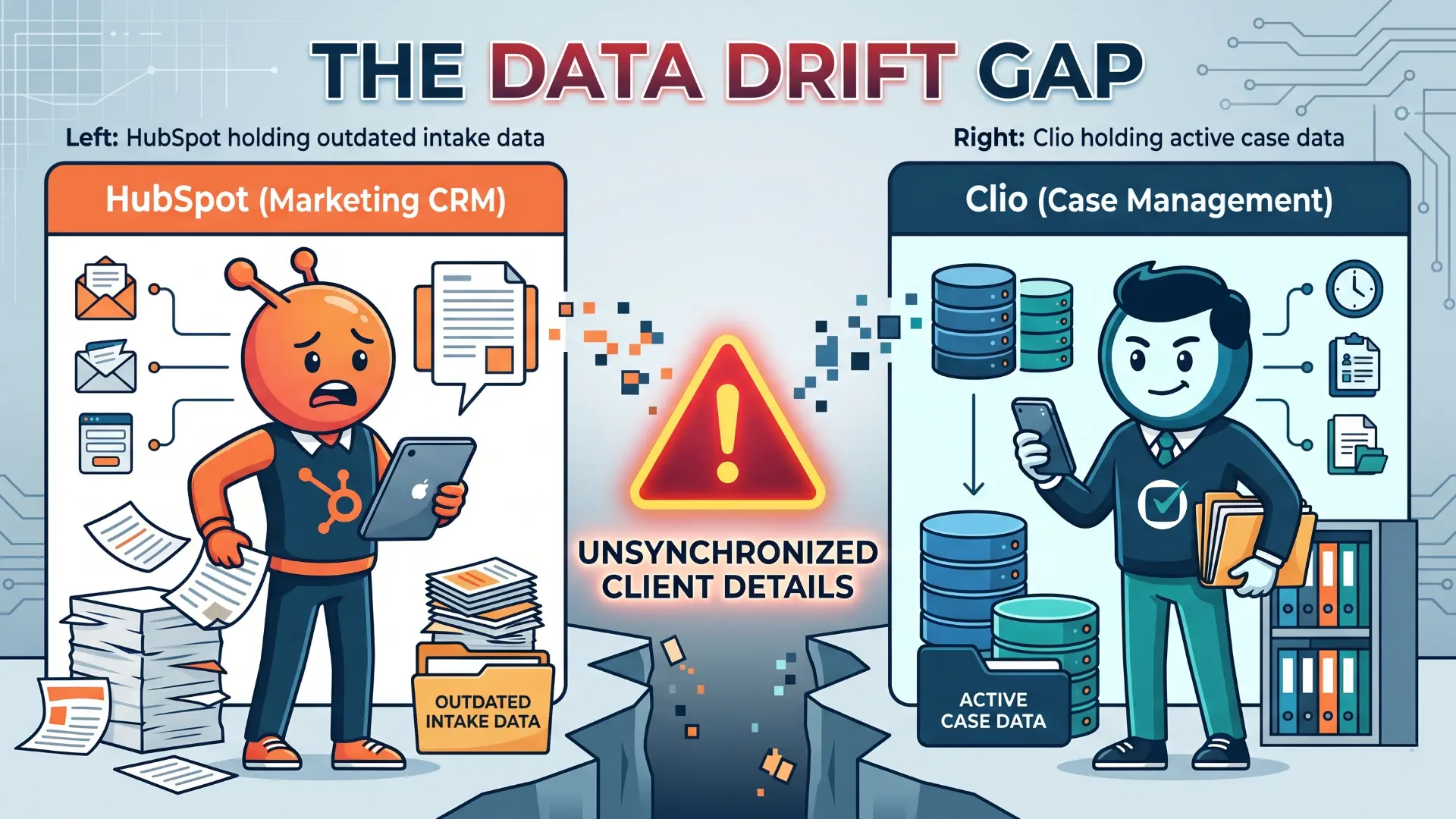
Sign 3: Uncontrolled Data Drift
When your marketing CRM and your case management system are connected by a basic one-way sync, they will fall out of alignment over time. This is Data Drift, and it creates real operational risk.
Consider a straightforward scenario: a client changes their phone number during their medical treatment phase. Your paralegal updates the record in Clio. But because your integration only fires on initial contact creation, that change never flows back to HubSpot. Your marketing team continues sending automated check-ins to the old number (or worse, triggers a re-engagement campaign to a client who is already actively litigating).
If your marketing database and your case files do not share a single, real-time source of truth, your CRM is generating liability, not efficiency.
Sign 4: The Zapier Sprawl Problem
Open your Zapier dashboard. How many separate, disconnected Zaps does it take to move a single lead from your web form into your CRM, assign it to an intake specialist, and add it to your calendar?
If the answer is more than five or six, you have a No-Code Sprawl problem.
Zapier is an excellent prototyping tool. It is not a production-grade infrastructure layer for a scaling law firm.
Every Zap in your chain is a potential point of silent failure. When an app updates its API (or a field name is renamed during a routine software update) your Zapier chain breaks quietly. You may go three days without realizing that dozens of PI leads dropped into a black hole because a single webhook fired into a renamed endpoint. At high lead volumes, this kind of silent failure is not an edge case; it is an eventuality.
Sign 5: The "Garbage In, Garbage Out" Crisis
A CRM is only as valuable as the quality of data in its database. If your system is flooded with duplicate contacts, half-completed intake forms, and records missing critical fields (like Case Type, Incident Date, or the referring source) your implementation has failed at the foundation level.
Once your intake staff stops trusting the data in the CRM, they stop using it. Low trust leads to inconsistent usage, inconsistent usage produces more dirty data, and dirty data further erodes trust. It is a compounding loop that eventually destroys the tool entirely.
The fix starts before go-live, not after. You need a Data Dictionary (a document that defines exactly what fields are required at each pipeline stage, what format they must follow, and what validation rules prevent incomplete records from advancing).
Sign 6: The Ghost Town Pipeline
Open your CRM pipeline right now. How many leads are sitting in the "New Inquiry" or "Intake Pending" stage that have not been contacted or moved in the last 30–45 days?
If you see dozens, you are looking at a Ghost Town Pipeline (a graveyard of stagnant leads that were captured, never properly routed, and silently lost).
This happens when a firm treats the CRM as a passive filing cabinet rather than an active routing engine. A functional intake pipeline has built-in velocity rules: if a lead is not moved to "Qualified," "Rejected," or "Closed (Not Retained)" within a defined window, the system should automatically flag it, escalate it, or re-route it to a supervisor. Without those rules, your most valuable uncontacted leads simply disappear into the pipeline and age out.
Sign 7: No Closed-Loop Marketing Attribution
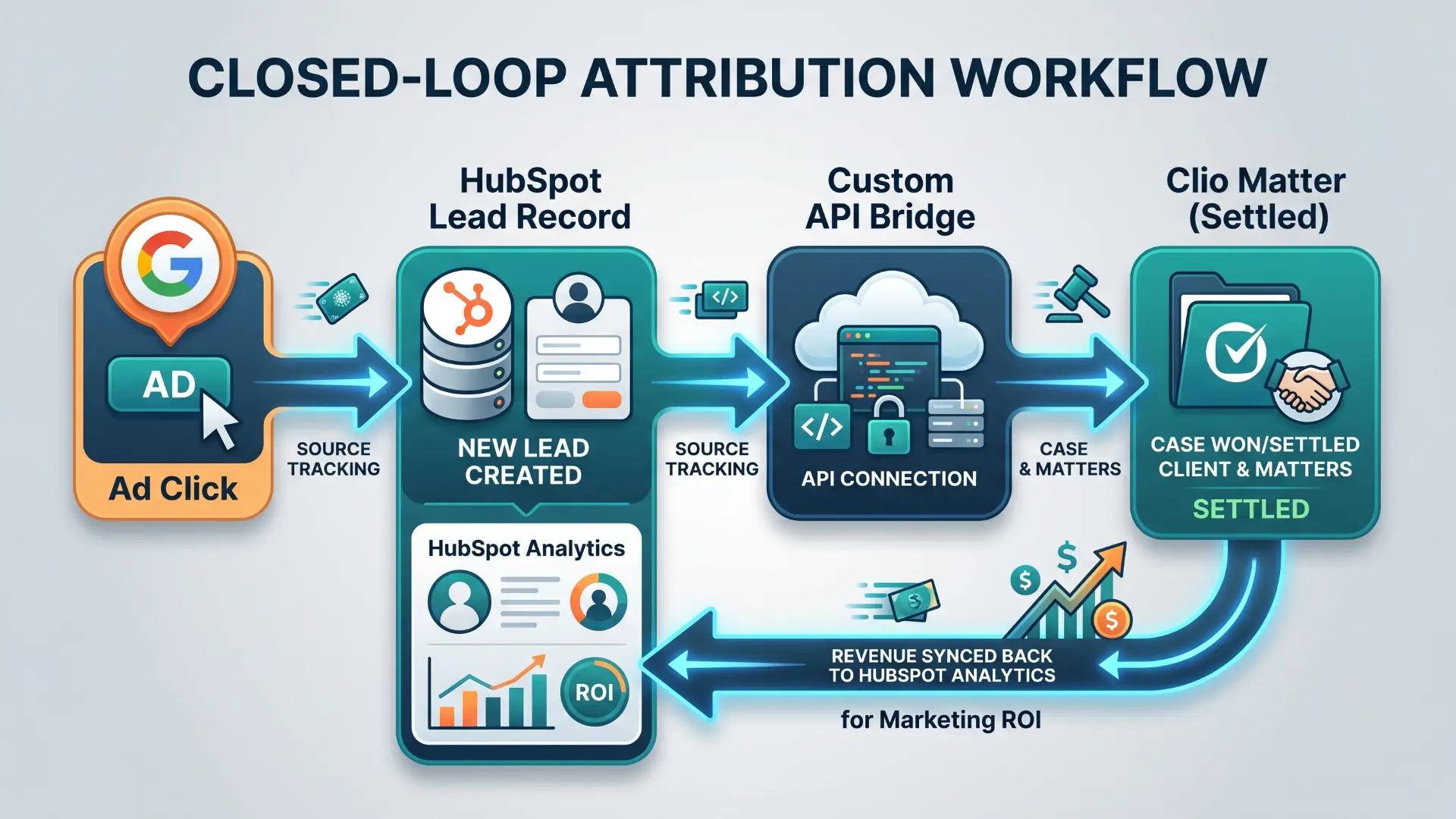
If you are spending $15,000–$25,000 per month on Google PPC, local service ads, and SEO (but you cannot trace a single settled case back to the specific campaign or keyword that generated it) your CRM has failed its primary business case.
A properly implemented CRM delivers Closed-Loop Attribution: when a matter closes in Clio, the settlement value automatically syncs back to the original deal in HubSpot, tying the final case revenue to the originating ad click.
Without that loop, you are optimizing your ad campaigns on raw lead volume (not on actual signed retainers and settled cases). That means you are almost certainly overspending on the wrong channels.
Sign 8: Feature Bloat That Kills Speed-to-Lead
Many managing partners see what large enterprises use and build toward that complexity from day one. They construct pipelines with 40 custom fields, nested conditional logic, and six mandatory intake steps before an intake specialist can send a consultation confirmation.
This is Feature Bloat, and it kills the thing that matters most in PI and immigration intake: speed-to-lead.
Research consistently shows that the first firm to make contact with a prospect after a web inquiry wins the case at a dramatically higher rate. If your intake specialist has to complete a 30-field form before they can send a retainer, they will not. They will find a workaround (and that workaround is usually the spreadsheet from Sign 1).
Build the Minimum Viable Intake: capture only the fields required to qualify the case and initiate contact. Add complexity only after your team has mastered the baseline workflow.
Sign 9: The CRM Was an IT Project, Not a Process Project
If your CRM was configured entirely by an external developer or your IT team (with zero design input from the intake specialists who use it every day) it was structurally compromised before it launched.
Technology amplifies the process it is built on. If your intake workflow is chaotic on paper, automating it makes it chaotic faster. A CRM that mirrors the way an IT department thinks intake should work (rather than the way your intake team actually processes cases) will be silently bypassed within 90 days.
The People-Process-Technology sequence matters. Vantage Point's published framework on CRM implementation puts it plainly: define your workflow and train your people first, then configure the technology around them (not the other way around). Organizations that follow this sequence are significantly more likely to hit their original implementation objectives. (Source: Vantage Point People-Process-Technology Framework)
Sign 10: The Case Management Disconnect
The final and most damaging sign of a failed CRM implementation is an organizational split that becomes cultural.
Your marketing team lives in HubSpot. Your attorneys live in Clio. Neither side knows what the other is doing. Your attorneys dismiss the CRM as an "irrelevant marketing tool," and your marketing team has no visibility into which leads actually became profitable cases.
This disconnect damages the client experience directly. When a client calls to ask about their case status, the person answering in the CRM has to open three separate systems to find an answer. The client does not experience two departments using different software (they experience one firm that does not know what is happening with their case).
A well-integrated CRM and case management system act as two halves of a single client record. One surfaces the relationship and the intake; the other manages the legal work and the billing. Separated, they are overhead. Connected, they are infrastructure.
The Recovery Plan: Three Steps to Salvage Your Investment
If your firm recognizes three or more of these warning signs, adding a new AI feature or switching to a different CRM platform will not solve the problem. You have integration and process debt that must be addressed at the foundation level first.
Step 1 - Run a Workflow Audit. Sit next to your intake specialists for two hours. Watch every click, every tab change, every manual data entry, and every workaround they have invented. Document all of it. The workarounds are your real system documentation.
Step 2 - Clean the Data Foundation. Purge duplicate records, archive ghost leads that are beyond your follow-up window, and implement strict field validation that prevents incomplete records from advancing through the pipeline. No clean data, no reliable attribution.
Step 3 - Build a Bidirectional API. Move away from one-way contact syncs and Zapier chains. Implement custom, event-based API triggers (via Google Apps Script, a dedicated middleware layer, or a professional integration) that manage the full Deal-to-Matter lifecycle automatically and with error logging.
At Wacmediya, this is the work we do. We audit the broken architecture, clean up the data foundation, and build the custom API bridges that connect your CRM to Clio or your practice management system of choice. We do not sell software licenses; we rescue the infrastructure around the software you already have.
If you are ready to stop paying for a system your team quietly hates, let's run an audit on your tech stack.
FAQ: Rescuing a Failed Law Firm CRM
Our adoption is low. Is it because we chose the wrong platform?
Almost never. The most common cause of low adoption is not the software (it is the workflow it was configured around). If the CRM requires more steps than the manual process it was supposed to replace, your team will rationally avoid it. Switching platforms without redesigning the workflow reproduces the same failure on a new interface. Fix the process first, then evaluate whether the platform needs to change.
How long does it take to clean up a failed CRM implementation?
In our experience at Wacmediya, a focused remediation project (covering pipeline audit, data cleanup, field standardization, and integration repair) typically takes four to eight weeks depending on the volume of existing records and the complexity of the integration layer. A full re-implementation with new data migration runs longer. The more accurate diagnostic question is: how long has the problem been running? Every month of accumulated dirty data adds to the cleanup timeline.
Why does Zapier break at high lead volumes?
Zapier processes triggers sequentially and has no native two-way conflict resolution. If a contact record is updated simultaneously in HubSpot and Clio, Zapier cannot determine which version is authoritative, creating overwrite errors. More practically, as Zap chains grow in complexity, any single failed step silently breaks the entire sequence with no automatic error notification unless you have specifically built alert logic. In our experience, firms processing more than 100 leads per month are generally better served by a custom API integration or a dedicated middleware tool with proper error logging than by a growing library of Zapier automations.
Can we fix a messy CRM without losing our existing client data?
Yes. A properly structured remediation process normalizes your data in place (standardizing field formats, merging duplicates, and archiving stale records) without deleting historical case logs. The key is running the cleanup against a staging environment first and validating the output before touching production data.
What does it actually cost to leave a CRM in a failed state?
The financial cost is harder to see than a line item on an invoice, which is why firms tolerate it longer than they should. It shows up as cases lost to competitors with faster follow-up, intake staff turnover driven by tool frustration, and marketing spend optimized toward the wrong lead sources because attribution data is unreliable. In our experience, the cost of operating a broken CRM almost always exceeds the cost of fixing it within the first year (and the gap widens every quarter).