
HubSpot vs. Salesforce for Law Firms: The Honest 2026 Comparison
Your firm is scaling, your intake pipeline is leaking, and you've hit the ceiling of basic tools. You know you need a real CRM.
Then comes the pitch. A tech-savvy partner tells you, "We need Salesforce. It's the industry standard." Meanwhile, your marketing director is pushing for HubSpot, arguing it's the only way to track ad campaigns and automate follow-ups without pulling your hair out.
This decision is high-stakes. Choosing the wrong system doesn't just waste subscription fees; it saddles your firm with technical debt and years of operational friction.
At Wacmediya, we don't sell software licenses. We build the database plumbing that connects these systems and we get called in to fix the ones that went wrong. This is an honest comparison of HubSpot and Salesforce for law firms in 2026, focused on what actually happens when these platforms meet the messy reality of legal operations.
The Architectural Philosophy: Ready-to-Run vs. Infinite Canvas
To choose between these platforms, you need to understand that they are built on fundamentally different assumptions about what you bring to the table.
HubSpot is a Product. It is a unified, single-database model. Marketing Hub, Sales Hub, and Service Hub all share one codebase. Update a phone number on a lead record in your marketing tool and it is instantly updated everywhere. There is no integration overhead because there is one database. HubSpot is designed to be operational within days and managed without an engineering department.
Salesforce is a Platform. It is an open, highly customizable framework of relational databases that does not tell you how your firm should run; it asks you to build it from scratch. You can model any workflow: complex multi-entity structures, nested referral networks, multi-state compliance logic. The catch is that none of this comes pre-built. Every database connection, pipeline layout, validation rule, and automation has to be configured by someone who knows what they are doing.

If HubSpot is a high-performance car ready to drive off the lot, Salesforce is a garage full of high-quality parts. If you do not have a mechanic on retainer, you are not going anywhere.
The 3-Year Total Cost of Ownership: The Hidden Admin Tax
Software vendors quote license fees. License fees are the smallest part of your actual cost.
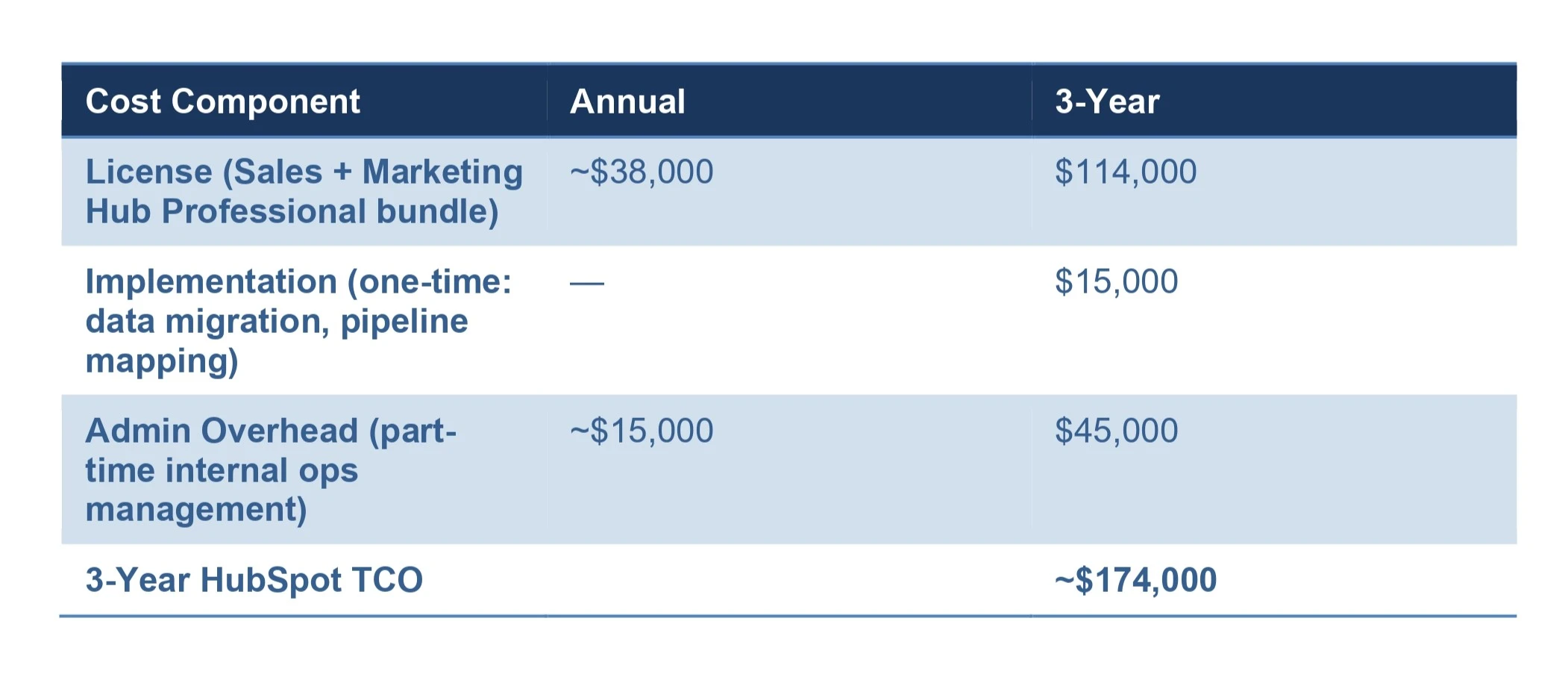
Here is the real 3-year TCO comparison for a mid-market law firm with 25 CRM users, using current 2026 pricing.
HubSpot Professional Customer Platform (25 Users)
Salesforce Sales Cloud Enterprise (25 Users)
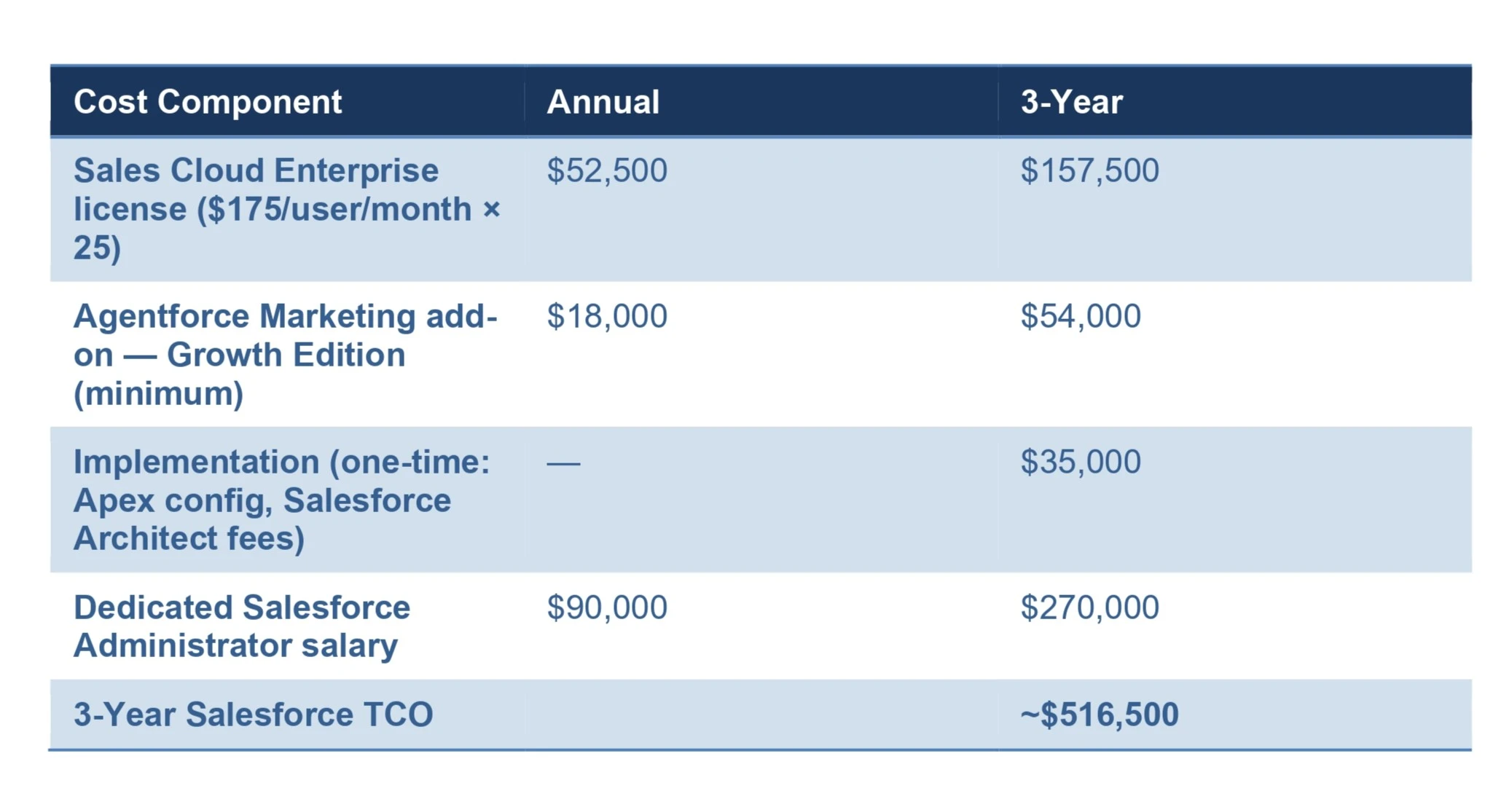
The gap is significant. A 25-user Salesforce deployment runs approximately three times the cost of the HubSpot equivalent over three years. The biggest driver is not the license; it is the administrator.
On the Admin Tax: A dedicated Salesforce Administrator in the US earns between $80,000 and $125,000 per year in base salary, based on current data from Glassdoor (25th–75th percentile as of June 2026). (Source: Glassdoor Salesforce Administrator Salary, June 2026) Add benefits and employment taxes, and the total employment cost is typically $110,000–$150,000 annually. Without one, a Salesforce environment degrades fast; validation rules break, pipelines drift, and staff quietly stop using it.

On Salesforce Marketing: Note that Salesforce does not include a meaningful marketing automation tool in the Sales Cloud license. Agentforce Marketing (formerly Salesforce Marketing Cloud) is sold separately. The entry-level Growth Edition starts at $1,500/month ($18,000/year). (Source: Cargas 2026 Salesforce Pricing Guide) Enterprise-level implementations can run $45,000–$180,000/year depending on contact volume and feature set.
Legal Intake & API Integration: The Battle of the Bridges
Here is the part most legal tech consultants miss: neither HubSpot nor Salesforce is a practice management system (PMS).
Your attorneys live in Clio, Filevine, or Smokeball. Your CRM manages the relationship and the intake. Your PMS manages the legal case and the billing. The success of your CRM investment therefore depends entirely on the quality of the API bridge connecting it to your PMS.
The Salesforce Side
Salesforce has the most extensive API ecosystem on the market through AppExchange. However, connecting Salesforce to Clio or Filevine is rarely a native experience. It typically requires custom Apex coding or middleware like MuleSoft. If you want a Salesforce record to automatically create a Matter in Clio with all custom case fields mapped, you are looking at significant custom development. And when Clio releases an API update that breaks that custom code, your intake pipeline halts until someone fixes it.
The HubSpot Side
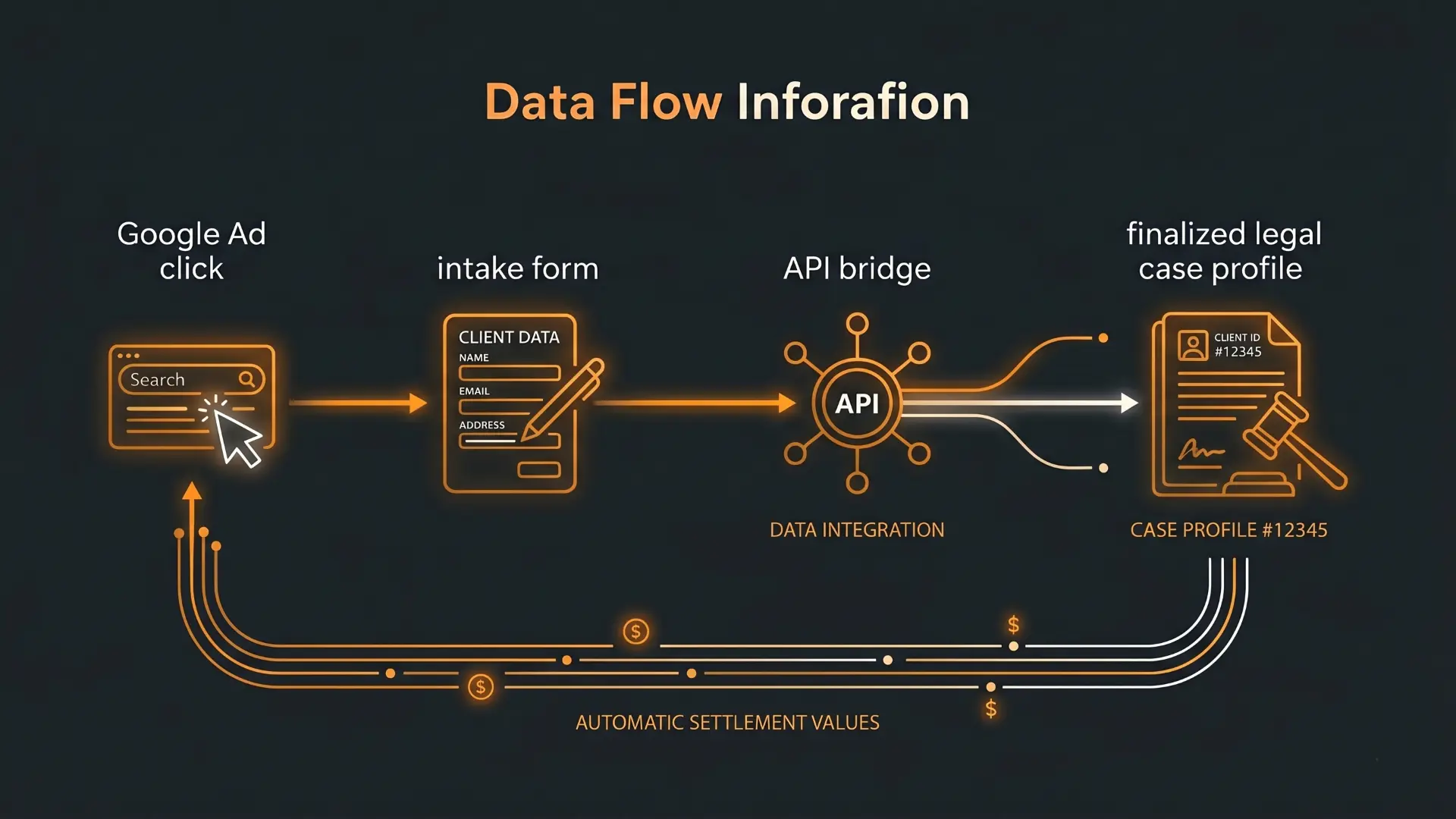
HubSpot's native Clio connector is primarily a contact sync; it does not automatically create a structured Matter in Clio when a Deal is marked "Won." But building a custom bridge in HubSpot is cleaner and faster. Using Google Apps Script or a streamlined iPaaS tool, you can build a stable, bidirectional sync that creates Clio Matters from HubSpot deals, maps custom fields (incident dates, insurance policies, case types), and pushes settlement values back to HubSpot for closed-loop marketing attribution.
As we cover in our HubSpot-Clio Integration Guide, this is the workflow that turns your CRM into a genuine intake engine, not just a contact database.
AI in 2026: Salesforce Agentforce vs. HubSpot Breeze
Both platforms have made major investments in autonomous AI capabilities in 2025–2026. Their execution targets different firm sizes and technical maturity levels.
Salesforce Agentforce is an enterprise-grade autonomous agent framework. It does not follow simple "if/then" scripts; it uses a reasoning engine (Salesforce calls it the Atlas Reasoning Engine) to interpret complex instructions, make decisions, and execute multi-step workflows. A firm with the technical infrastructure could configure an Agentforce agent to monitor incoming medical records, match them against a checklist, verify completeness, and draft a demand letter template. The constraint: Agentforce requires Enterprise-tier pricing, custom configuration, and technical oversight to deploy reliably. It is powerful precisely because it is not plug-and-play. (Source: Salesforce Agentforce)
HubSpot Breeze AI is built for immediate time-to-value. Breeze Assistant is available across all HubSpot plans, including free. Full Breeze Agents, including the Prospecting Agent and Customer Agent, are available on Professional and Enterprise tiers. (Source: HubSpot Breeze AI) Breeze excels at practical intake tasks: enriching a lead's company profile, cleaning duplicate contacts, and drafting follow-up emails based on intake form data. It is less capable than Agentforce at complex, multi-system reasoning, but a team can deploy a Breeze workflow in hours, not months, without writing code.
The AI gap between the two platforms is real in 2026, but it mirrors the broader platform gap: Agentforce is more powerful and requires a team to match; Breeze is more accessible and works well for firms that want AI operational within their current headcount.
The Verdict: Which CRM Fits Your Firm?
There is no universally "better" platform, only the one that fits your firm's operational reality.
Choose HubSpot if your firm:
Has under 100 staff and no dedicated in-house IT department
Spends heavily on Google Ads or Meta and needs to trace settlement dollars directly back to specific ad campaigns
Wants to be live and training staff within weeks, not six months
Needs marketing and intake teams to manage the CRM without developer dependency
Choose Salesforce if your firm:
Is a large multi-state enterprise (150+ staff) managing multiple distinct legal entities, dozens of offices, and complex relational data that standard CRMs cannot model
Has a dedicated IT/Ops budget and can fund a full-time Salesforce Administrator and a custom software agency
Requires highly tailored financial reporting: complex partner commission structures, referral fee splits across hundreds of firms, multi-entity forecasting
If your firm sits between these two profiles, say, 40–100 staff, strong growth, and a serious intake operation, HubSpot Professional is almost always the faster and more cost-effective path. You can migrate to Salesforce later if the operational need genuinely outgrows what HubSpot can do.
Conclusion: Fix the Foundation First, Then Choose the Tool
The wrong CRM does not fix a broken process. If your intake team is manually copying data between systems and your Clio records never match your HubSpot records, switching platforms without fixing the underlying data model will just reproduce the same chaos in a new interface.
Before you sign a multi-year contract with either platform, you need to:
Clean and standardize your existing contact data
Map your actual intake-to-matter pipeline (not the ideal version, the real one)
Define which fields need to sync between your CRM and your PMS
At Wacmediya, we do this work before any CRM implementation. We help you choose the right platform, build and maintain the custom API bridges that connect it to Clio or Filevine, and configure the automations that let your team focus on cases instead of data entry. If you are ready for a no-cost audit of your current CRM setup, let's talk.
FAQ: HubSpot vs. Salesforce for Law Firms
Is Salesforce secure enough for confidential client data?
Yes, both platforms provide enterprise-grade security controls that can meet law firm data handling requirements. The relevant compliance framework for law firms is not HIPAA (which governs healthcare entities), but the ABA Model Rules on Safeguarding Client Information, your state bar's ethics rules, and attorney-client privilege obligations. Both HubSpot and Salesforce offer encryption at rest and in transit, role-based access controls, and audit logging. For firms with strict data governance requirements, Salesforce offers an optional add-on called Salesforce Shield that adds additional field-level encryption and event monitoring. Your IT or compliance counsel should review which controls are required for your specific practice areas before choosing a platform.
Do we need to leave our practice management system (Clio or Filevine) if we choose HubSpot?
No. HubSpot is designed to function as the marketing and relationship layer that sits in front of your PMS, not replace it. Clio manages cases, billing, and trust accounts. HubSpot manages lead qualification, intake, and marketing attribution. The key is a properly built API bridge between the two; when a lead converts in HubSpot, the corresponding Matter should be created in Clio automatically, with all case fields mapped correctly.
Can a law firm manage HubSpot without a dedicated system administrator?
Yes, for most ongoing operations. HubSpot's visual builder and no-code workflow tools are designed for operations managers and marketing directors, not engineers. Minor updates, changing a field mapping, adding a pipeline stage, adjusting a follow-up sequence, are achievable without technical support. For structural changes (CRM migrations, new API integrations, major workflow rebuilds), a specialist should be involved to avoid data loss.
Why is Salesforce so much more expensive to implement?
Salesforce's architecture is a blank canvas. Every pipeline, every database relationship, and every validation rule must be configured by a certified Salesforce Architect. Implementation typically takes three to six months and requires engineering expertise at each step. This is not a vendor failure, it is the trade-off for having infinite customization. The complexity that makes Salesforce powerful for a 500-lawyer firm is what makes it financially punishing for a 25-person practice.
Which platform is better for after-hours automated intake?
HubSpot's open API architecture makes it well-suited for integrating with agentic AI systems for after-hours intake, where late-night leads are autonomously qualified, checked against your case criteria, and routed for follow-up before your team arrives in the morning. This is achievable on both platforms, but HubSpot's lighter infrastructure overhead makes it faster to build and maintain these integrations without a full engineering team on call.