Google Apps Script for Law Firms: The Automation Layer You're Missing
Your legal tech stack is likely a collection of high-priced monthly subscriptions. You pay for HubSpot to capture leads, Clio to manage cases, and Google Workspace to run your documents and email.
When you need these systems to actually talk to each other in a specific way that mirrors your firm's intake workflow you usually get two options: pay a software agency $50,000 for a custom application, or stitch together a Zapier workflow that charges you for every single automated action, indefinitely.
What if the better option was already inside your Google Workspace account, completely free?
In 2026, one of the most underused assets in legal operations is Google Apps Script (GAS) a serverless, JavaScript-based runtime environment built directly into Google Workspace. It allows you to build custom integrations, bridge the gaps between your legal platforms, and automate complex workflows without paying a middleman for every transaction.
This guide covers how it works, the real-world use cases where it outperforms Zapier, and crucially the hard technical limits you must design around to keep your systems running reliably at scale.
The Zapier Tax: Why iPaaS Costs Don't Stay Predictable
Zapier and Make are excellent tools for simple automations and prototyping. But as your firm scales, the pricing model turns into an operational liability.
Both platforms charge per "task" one successful action step counts as one billable task. A single workflow that triggers a new HubSpot record, creates a Google Drive folder, and logs a Clio matter entry consumes three tasks per lead. At high volume, the math compounds quickly.
As of 2026, Zapier's Professional plan the minimum tier for multi-step workflows starts at around $49/month for 2,000 tasks. The Team plan runs $69/month. (Source: Zapier.com) A PI or immigration firm processing 300 leads per month through a 6-step intake workflow burns 1,800 tasks in that workflow alone, putting you at or near the cap before your team sends a single manual email. Higher task volumes push firms onto custom Enterprise pricing which is where "thousands of dollars a year in middleware fees" becomes a real line item.
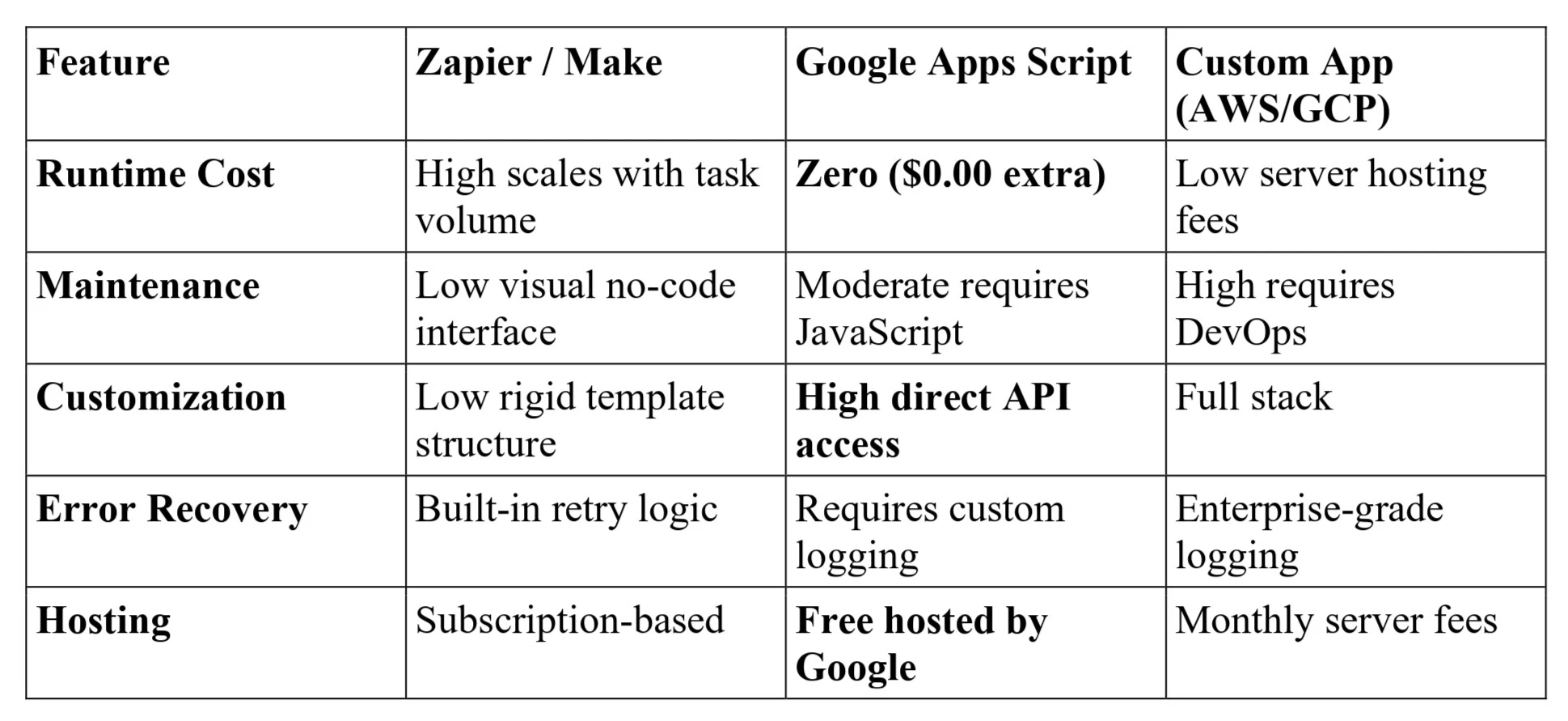
Google Apps Script, by contrast, runs entirely on Google's infrastructure at zero additional runtime cost. Your Google Workspace subscription covers it. Whether a script runs 100 times or 10,000 times in a month, your bill doesn't change.
Zapier vs. Google Apps Script vs. Custom App: A Practical Comparison
3 Core Use Cases: Where Google Apps Script Actually Wins
Google Apps Script is not a replacement for native connectors where they work well. It is the right tool for the legal-specific workflows that off-the-shelf integrations simply do not cover.
1. Closing the HubSpot-to-Clio Matter Creation Gap
The native HubSpot-Clio connector does one thing: sync contacts. It does not automatically create a structured Matter in Clio when a Deal is marked "Won" in HubSpot.
As we covered in our HubSpot-Clio Integration Guide, this gap forces your intake team into a manual copy-paste process for every single retainer conversion introducing data entry errors directly into your billing records.
With Google Apps Script, you write a script that listens for a HubSpot webhook. The moment a deal is marked "Won," the script:
· Queries the HubSpot API for all custom case details (incident date, case type, opposing party, medical provider)
· Authenticates with the Clio API using OAuth2
· Creates the Clio Matter, maps the client contacts, and populates custom fields from your HubSpot data automatically
No manual entry. No duplicate data. No typos in the billing file.
2. Auto-Generating Structured Google Drive Case Folders
Most practice management platforms create a single flat folder per new client. If your attorneys work from a structured folder hierarchy 01_Pleadings, 02_Medical_Records, 03_Discovery, 04_Correspondence a paralegal is manually recreating that structure for every single case.
A Google Apps Script listens for a "New Matter" event in Clio. The moment a case is opened, the script duplicates a master template folder in Google Drive, renames every subfolder using the client name and case number, and writes the Drive links back into custom fields on the Clio matter card.
What previously took 8–10 minutes of paralegal time per case takes 0.
3. True Bidirectional Contact Sync Without Data Drift
When client data lives in two systems simultaneously, it will fall out of sync. An attorney updates a phone number in Clio; the marketing team continues to send campaigns to the old one in HubSpot.
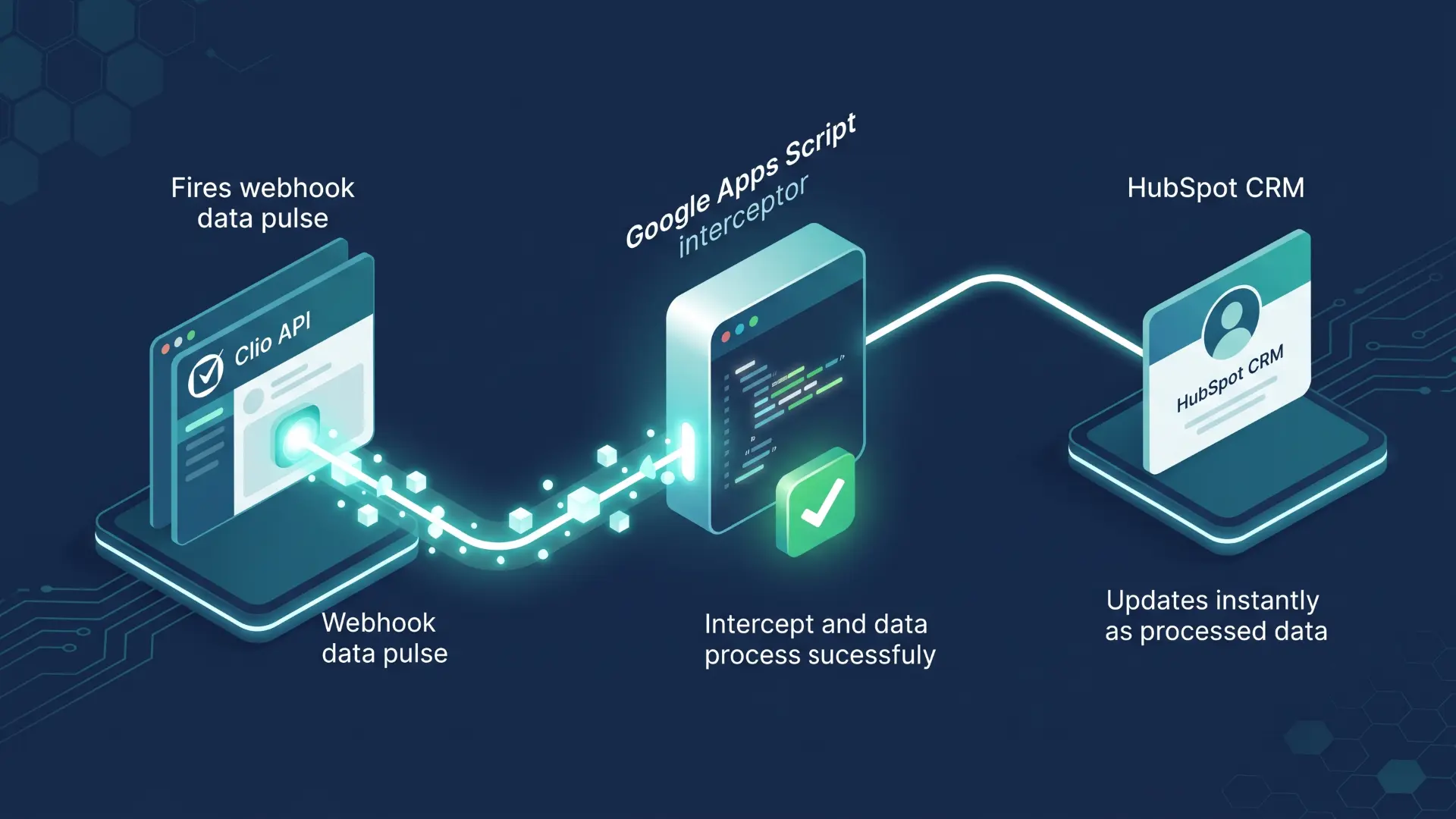
Using Google Apps Script deployed as a Web App a secure endpoint hosted by Google you can set up a real-time translation bridge. When Clio triggers an update_contact event, the Apps Script web app validates the incoming data, matches the record by unique ID, and updates HubSpot instantly. No lag. No drift.
The Uncomfortable Truths: What Google Apps Script Cannot Do
At Wacmediya, we do not recommend tools without explaining their failure modes. Google Apps Script is powerful, but it has hard platform limits that will break your automations if you do not design around them from the start.
1. The 6-Minute Execution Ceiling
Every Google Apps Script invocation has a hard maximum runtime of 6 minutes. If your script loops through 5,000 records, fetches their status from an external API, and updates each one, it will hit this wall and terminate mid-execution silently dropping the remaining records. (Source: Google Apps Script Quotas documentation)
The fix: Design scripts to be state-aware. Process records in batches, write your "last processed row" to script Properties storage after each batch, and use a time-based trigger to resume the script five minutes later. This is not optional for production legal workflows it is table stakes.
2. Google Sheets Is Not a Database
Many law firms start by using Google Sheets as a lightweight intake tracker. That works fine for one user. It fails when multiple intake specialists submit data simultaneously triggering concurrency locks, overwriting each other's records, or throwing script errors with no audit trail.
The fix: Build a lightweight Google Apps Script Web App as the intake interface. Users submit to the web app; the web app serializes and queues write operations programmatically. No concurrent locks. No lost records.
3. Email and API Quotas Have Real Ceilings
Google limits how many email recipients a script can contact per day via MailApp or GmailApp approximately 100 recipients/day for consumer Gmail accounts and 1,500 for Google Workspace accounts, though Google reserves the right to change these limits without notice. (Source: Google Apps Script Quotas) Similarly, UrlFetchApp (which powers all external API calls) has daily request limits per account.
The fix: Route bulk email notifications through dedicated delivery APIs like SendGrid or Mailgun, called from the script via UrlFetchApp. Reserve MailApp for individual transactional messages only.
The 2026 Reality: "Vibe Coding" Lowers the Floor But Raises the Stakes
The term "vibe coding" was coined by AI researcher Andrej Karpathy in February 2025 and it describes something genuinely useful: you describe a workflow in plain English, an AI generates the working script, and you iterate through prompts rather than through syntax. Collins Dictionary named it the 2025 Word of the Year, and the practice has become widespread across non-engineering teams.
This matters for law firms because it means your operations manager not a developer can now prompt Claude or ChatGPT to write a Google Apps Script that auto-generates a PDF intake summary from a Google Form, emails it to the client, and logs the event in a Clio note. The script they get back will often be 80% correct.
The other 20% is where firms get burned.
AI-generated code is prone to hallucinating API structures, ignoring quota limits, and producing scripts with no error handling. Deployed directly into a production environment, a script like this will run silently until it fails and when it fails, it fails on a real client record.
The right model is a Human-in-the-Loop policy: AI writes the first draft, a systems architect reviews the error handling, tests against quota limits, and audits API authentication. Wacmediya operates this way. We use AI to accelerate script development; we use engineering discipline to make sure it does not break on month two.

Conclusion: Stop Renting Automations. Start Owning Infrastructure.
If your firm is spending hundreds of dollars a month to move your own data between the platforms you already pay for, you have a plumbing problem not a software problem.
Google Apps Script is the most underutilized asset in your existing Google Workspace subscription. It allows you to build the exact automation rules your firm's workflow requires, without paying a middleware vendor for the privilege of accessing your own APIs.
At Wacmediya, we design and build production-grade Google Apps Script systems for law firms including the HubSpot-Clio matter creation bridge, Drive folder automation, and bidirectional contact sync workflows described above. We also maintain them, monitor quota health, and update the code when platform APIs change.
If you are ready to replace your middleware bill with owned infrastructure, let's start with a tech stack audit.
FAQ: Google Apps Script for Law Firms
Is Google Apps Script secure enough for confidential client data?
Google Apps Script runs within your firm's Google Workspace tenant, which means client data is processed on Google's infrastructure under the access controls and security policies your Google Workspace administrator has configured. That is a meaningful security boundary. However, security is determined by how your Workspace environment is configured not by the script itself. Firms with strict data governance requirements should review their Google Workspace security settings, ensure appropriate access scopes are requested by any script, and consult their IT or compliance counsel on data handling policies. Google Workspace CAN be configured to meet various compliance standards, but that configuration requires deliberate setup, not just using Google's tools.
Do we need a developer to maintain these scripts once they are built?
For minor modifications changing a field mapping, updating a folder naming convention AI coding tools in 2026 make it feasible for a tech-literate operations manager to handle the change. For structural updates, particularly when Clio, HubSpot, or any external API changes its authentication model or endpoint structure, a professional systems architect should audit and test before the update goes live. API-breaking changes in production without testing are the most common cause of silent automation failures.
Can Apps Script integrate with non-Google products?
Yes. The UrlFetchApp service allows Apps Script to make standard HTTPS requests to any open API. This includes Clio, HubSpot, Salesforce, Filevine, Docketwise, MyCase, SendGrid, Twilio, and any court-filing portal that supports API access. If the platform has a documented REST API and supports token-based or OAuth2 authentication, Apps Script can communicate with it.
What is the difference between a simple macro and a full Google Apps Script?
A macro is a recorded click sequence that Apps Script writes behind the scenes it is limited to actions within a single Google Sheets file. Custom Apps Script is the actual programming environment underneath macros. It can call external APIs, generate and modify Google Docs, manage Drive file structures, send emails, set up time-based triggers, and deploy as a web app that accepts incoming data from outside Google. The capability gap between the two is significant.
How much does it cost to implement a custom Apps Script workflow?
The ongoing runtime cost is zero covered by your existing Google Workspace subscription. The upfront cost depends on the workflow's complexity. A standard integration like Clio-to-Drive folder automation typically requires 15–30 hours of design, scripting, testing, and implementation. A bidirectional CRM sync with error handling and quota monitoring runs longer. At Wacmediya, we scope each project after an initial tech stack audit so there are no surprises.