
AI-Powered Medical Records Automation for PI Firms | Workflow Guide
In a Personal Injury firm, your demand package is only as strong as your last medical record. Yet, for most firms in 2026, medical record retrieval is still a manual game of telephone. Your case managers spend hours every week calling hospitals, faxing HIPAA authorizations, and checking tracking spreadsheets that are almost always out of date.
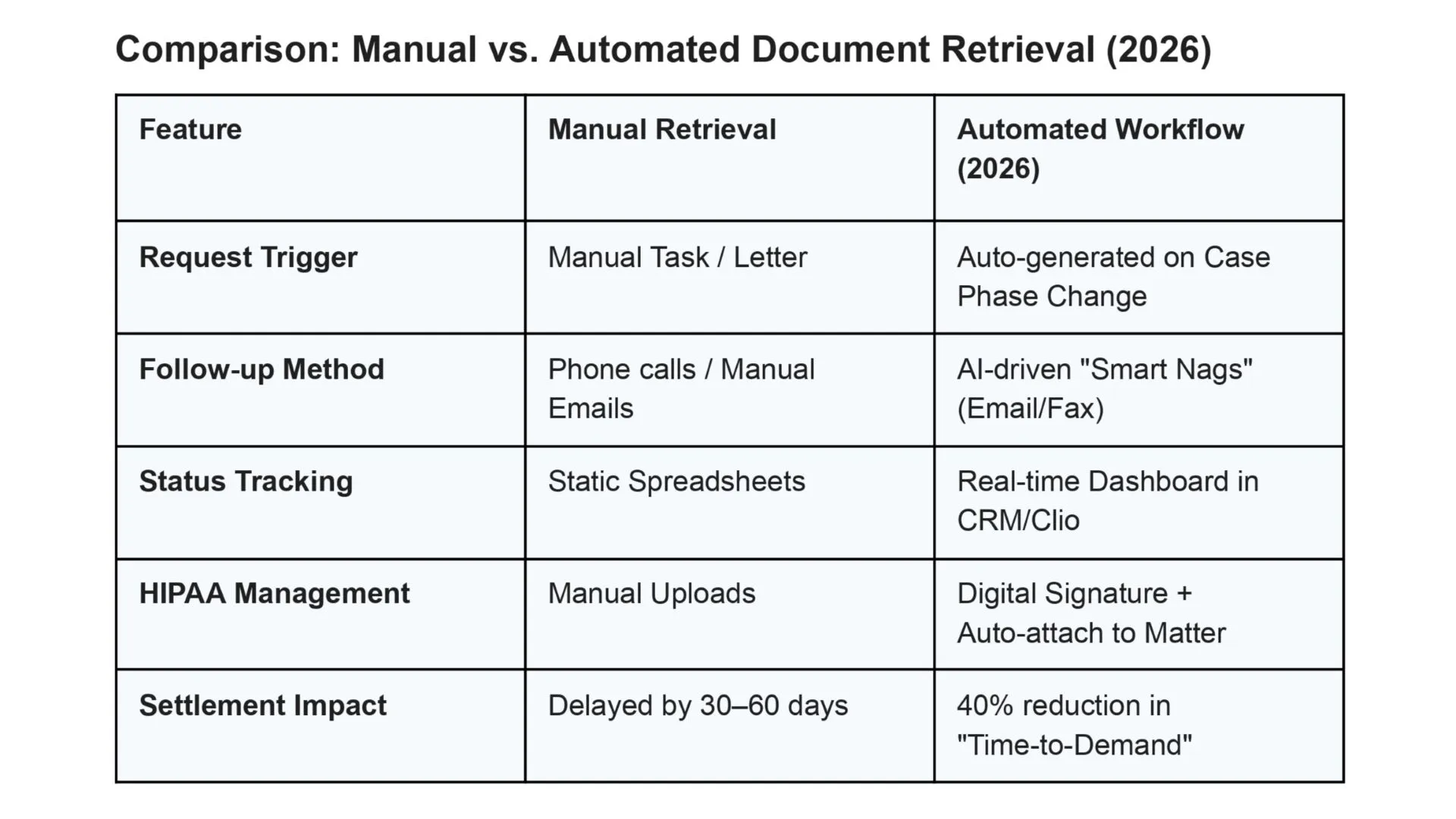
This isn’t just an administrative annoyance it’s a Settlement Delay Tax. Without medical records request automation, if it takes your firm 60 days to collect records that should take 15, you are carrying the overhead of that case for an extra 45 days. Across a large caseload, that delay compounds into a significant hit to your firm’s liquidity and internal rate of return.
The solution isn’t to hire more document chasers. The solution is to build a document tracking infrastructure that automates the repetitive parts of the chase the follow-ups, the status checks, the CRM updates so your team only steps in when human judgment is actually needed.

The “Paper Chase” Tax: Why Manual Document Tracking Fails at Scale
The “standard” document retrieval process at most PI firms is a masterclass in inefficiency. A paralegal sends a request, marks a calendar reminder for 14 days out, and then… they wait. When day 14 arrives, they call the provider, wait on hold for 20 minutes, only to be told the request “was never received.”
This cycle repeats until the record finally arrives often incomplete.
At Wacmediya, we call this Digital Janitorial Work. It’s the lowest-value use of a case manager’s time, and it’s exactly the kind of repetitive administrative task that keeps your firm trapped in what the industry calls PI case management bottlenecks.
The data backs this up. According to Clio’s 2025 Legal Trends Report, growing law firms use time-saving automations at roughly two to three times the rate of shrinking firms and administrative operations represent the single largest category where automation drives measurable improvement. The report also found that firms embracing AI-powered workflows are growing revenue approximately four times faster than their headcount, meaning they’re handling more cases with the same team, not throwing bodies at the problem.
In 2026, the gap between the “Growth Firms” and the “Struggling Firms” is defined by who has automated this loop.
Building the Medical Records Request Automation Workflow Most Firms Are Missing
Most firms think they have “automation” because they use a document assembly tool. That’s only 10% of the battle. The real value is in the follow-up loop the infrastructure that ensures no record request falls into a black hole. Here is the workflow most PI firms are missing:
1. Phase-Based Triggers
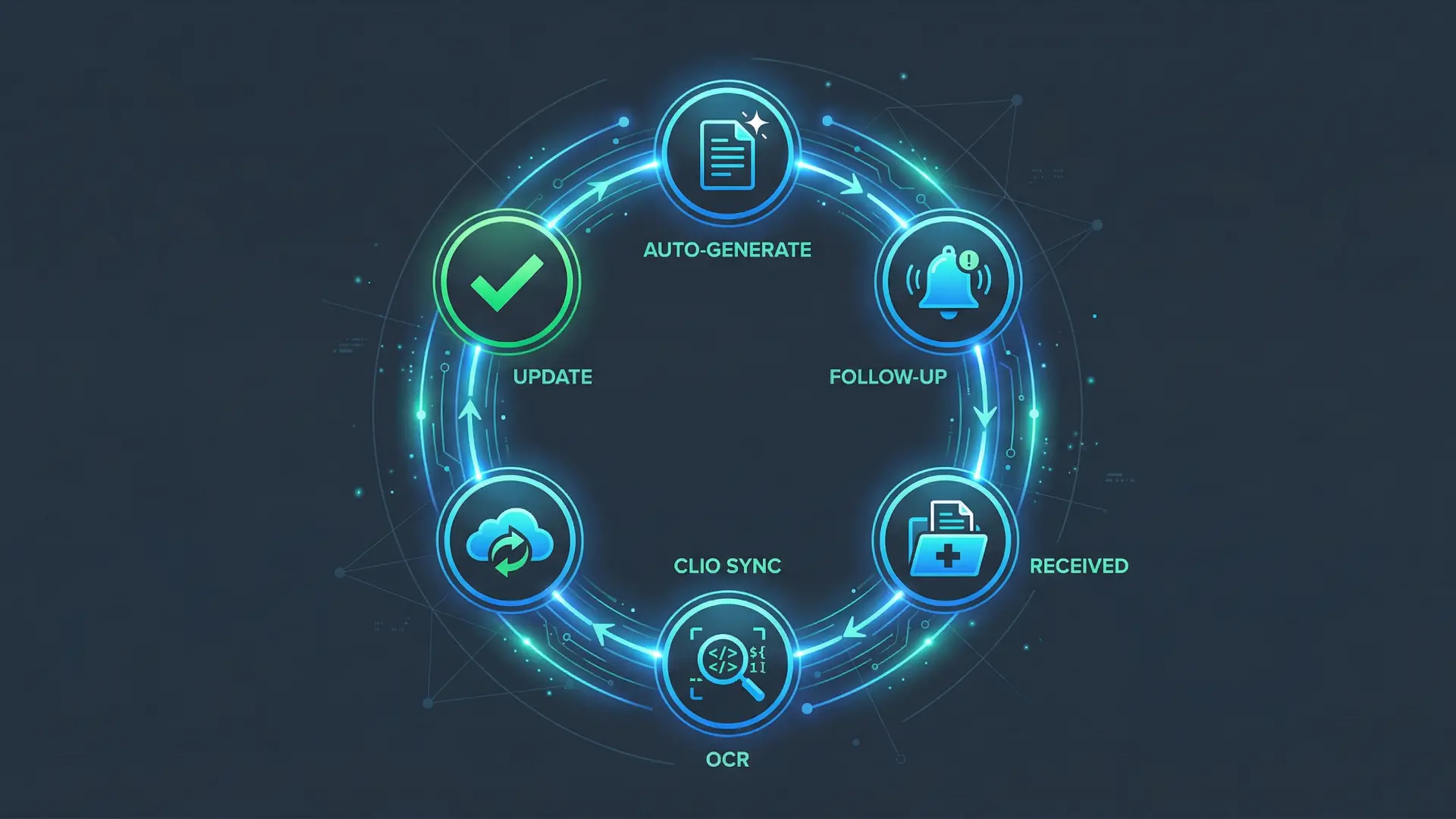
Instead of a human remembering to order records, the request should be triggered the moment the case moves to the “Treatment” phase in your CRM whether your firm uses Clio, HubSpot, Filevine, GoHighLevel, or Salesforce. The system identifies the providers listed during intake and automatically generates the HIPAA-compliant request.
This is critical because timing matters more than most firms realize. Under HIPAA’s Privacy Rule, healthcare providers are required to fulfill records requests within 30 days, with one possible 30-day extension. As of December 2025, HHS’ Office for Civil Rights had taken 55 enforcement actions against providers who failed to meet this standard. The sooner your request goes out accurately and completely the sooner that 30-day clock starts ticking.
2. The “Smart Nag” Infrastructure
This is where automation does the heavy lifting. If a provider hasn’t acknowledged the request within a set timeframe (we typically configure 72 hours), the system doesn’t wait for a human to notice. It sends a polite, automated follow-up via email or digital fax the two channels that can be reliably automated. For providers who require portal submissions or phone calls, the system flags these as exceptions and routes them to a case manager immediately rather than letting them sit.
If there’s still no response after 7 days and multiple automated attempts, the system escalates the task to the case manager with full context what was sent, when, and through which channel. The human only steps in after the automated sequence has been exhausted.
This eliminates the most common failure mode in legal document tracking: the paralegal who was “going to follow up on Tuesday” but got pulled into depositions and forgot. The system never forgets.
A note on channel limitations: not every provider can be reached through automated channels. Some still require phone calls or have proprietary portals with unique login requirements. A well-designed system accounts for this by maintaining a provider preference database that your team builds over time flagging which providers accept fax, which require portal access, and which need a phone call. This database gets more accurate with every case.
3. Bidirectional Data Sync
When a record is received, it shouldn’t just sit in an inbox. A properly built stack runs the document through OCR (Optical Character Recognition) to make it searchable, then uses rule-based logic and AI-assisted classification to suggest which Matter it belongs to and what type of record it is. A team member reviews and confirms the match this takes seconds compared to the minutes of manual filing and the document is attached to the correct Matter in Clio or your case management platform. The “Record Received” event then triggers the next phase of the case: Medical Indexing.
It’s important to be realistic here: AI-assisted document classification works well for straightforward records (lab results, radiology reports, billing statements), but medical records are messy handwritten notes, poor scans, inconsistent formats across providers. Expect the system to handle the bulk of classification correctly, with a human confirming edge cases. The time savings come from reducing a 5-minute-per-document filing process to a 15-second confirmation.
Once the record is categorized and attached, the next frontier is AI-powered medical chronology extracting treatment timelines, ICD codes, and provider details into a structured format ready for demand preparation. Platforms like Tavrn, LawPro.ai, and Litify are advancing this space rapidly. But here’s the thing: chronology tools are only as good as the records they receive. If your retrieval and tracking infrastructure is broken, your chronology tool is working with incomplete data and your demand package suffers.
Why Retrieval Services and Integrated Platforms Still Leave a Gap
Many firms try to solve this by hiring a third-party retrieval service or switching to a case management platform with built-in retrieval (CloudLex’s RecordXtract, CASEpeer’s integration with Rob Levine Legal Solutions, or ChartRequest). These tools have genuinely improved the ordering and receipt of records.
But they often leave a critical gap: the internal workflow layer.
Even firms using integrated retrieval platforms still face a disconnect: the platform handles the request and receipt of records, but the internal follow-up logic the smart escalation, the phase-based triggers, the CRM status updates that keep attorneys informed without having to ask is often missing or limited to basic reminders. That’s the infrastructure layer we build.
If your attorney is preparing for a deposition and has to ask a paralegal, “Do we have the MRI results yet?”, your infrastructure has failed. A truly unified personal injury document management ecosystem brings that status data inside your CRM timeline. Whether you use a retrieval service, handle it in-house, or use a hybrid approach, the status of every record must be visible on the client’s timeline updated automatically, not manually.
ROI: How Document Automation Lowers Your Cost Per Acquisition

Managing partners often view document retrieval as a “cost of doing business.” At Wacmediya, we view it as a lever for profitability. When you automate the document chase, three things happen:
Case Cycles Shrink. You reach the demand phase faster, leading to quicker settlements. The math is straightforward: if your average record collection takes 45 days manually and automation cuts even 15 days off that timeline by eliminating follow-up delays and missed requests, that’s 15 fewer days of carrying costs per case. Across a large caseload, the cumulative cash flow impact is substantial.
Overhead Drops. You can handle more cases with the same headcount because your staff isn’t “chasing paper.” The Clio 2025 Legal Trends Report found that roughly 81% of legal secretaries’ and administrative assistants’ tasks are exposed to AI automation. Document follow-up is one of the most straightforward to automate and one of the highest-volume.
Visibility Increases. You stop discovering missing records at the worst possible time during deposition prep or demand drafting. An automated system can track which providers have responded and which haven’t, surfacing non-responses early so your team can intervene while there’s still time. It won’t catch every incomplete record from a single provider (that requires human medical knowledge to assess), but it ensures that no provider is forgotten entirely which is where the biggest losses happen.
Stop Chasing, Start Scaling
In 2026, “Document Chasing” should be a ghost of the past.
The most critical piece of evidence in a PI case the medical record should not be managed in a disconnected spreadsheet. By building a structured retrieval workflow with medical records request automation at its core, you free your team to focus on the legal strategy, not the administrative friction.
At Wacmediya, we don’t just “fix CRMs.” We build the document tracking infrastructure that connects your retrieval process to your case management system so nothing falls through the cracks between “request sent” and “record received.” If you’re tired of the “Paper Chase Tax” and ready to tighten your case cycles, an audit of your document infrastructure is the place to start.
→ Book a Free Document Infrastructure Audit We’ll map your current retrieval workflow, identify the bottlenecks, and show you where automation can tighten your case cycles.
FAQ: Medical Records Automation for Law Firms
Is automated medical record retrieval HIPAA compliant?
Yes provided the infrastructure is built on platforms that support HIPAA compliance. Under the HHS Privacy Rule, all protected health information must be transmitted securely, and digital signatures must be handled through audited channels. Platforms like Clio are built for legal and support HIPAA-aligned workflows natively. HubSpot offers HIPAA-compliant features at the Enterprise tier with specific configuration. GoHighLevel requires additional configuration and BAA (Business Associate Agreement) setup. The key point: HIPAA compliance isn’t a checkbox it depends on how the platform is configured, what data flows through it, and whether proper agreements are in place. We configure these workflows with compliance as a baseline requirement.
Does this work with providers who only use fax?
Absolutely. A professional automation stack includes digital fax integrations (services like SRFax or Phaxio). The system sends a digital file that arrives as a physical fax at the provider’s office. For incoming faxes, the system can route them to a shared inbox where a team member confirms the client match and files the document or, with additional configuration, use OCR-based rules to suggest the correct matter based on patient name and case number. Fully automatic routing based on fax content is possible but requires careful setup and human oversight, especially in the early stages.
What if the hospital requires a specific, non-standard form?
The system is built with “Exception Logic.” Most providers accept standard HIPAA authorization forms, and for these, the process runs without manual intervention. However, some providers particularly larger hospital systems require their own specific forms. The system maintains a provider database that flags these requirements during the intake phase so they can be handled upfront, rather than discovering the problem 30 days later when the request gets rejected. This database improves over time as your team processes more cases and logs provider-specific requirements.
How does this integrate with Clio?
We use custom API bridges to ensure that every status update in the retrieval process is reflected in Clio. When a document is finalized, it is pushed directly to the “Documents” tab of the specific Matter, triggering a notification to the assigned attorney. The same approach works with Filevine, HubSpot, and GoHighLevel we build to your existing stack, not the other way around.
What is the “Settlement Impact” of this technology?
The impact is primarily in time-to-demand. When records arrive faster and nothing gets lost in the follow-up process, your firm reaches the demand phase sooner. The exact improvement depends on your current process firms relying entirely on spreadsheets and manual reminders typically see the largest gains, while firms already using a retrieval service will see incremental improvements in internal visibility and coordination. The broader financial impact comes from reduced carrying costs per case and the ability to handle more cases at the same headcount, both of which directly improve your firm’s cash flow.
How does this compare to using a retrieval service like ChartRequest or Record Retrieval Solutions?
Third-party retrieval services handle the ordering of records and many do it well. Our automation handles the internal tracking, follow-up, and CRM integration that keeps your attorneys and case managers informed in real time. The two work well together: a retrieval service for the provider relationship and established network, and our infrastructure for the internal workflow that ensures nothing falls through the cracks between request and receipt. They’re complementary, not competing.